
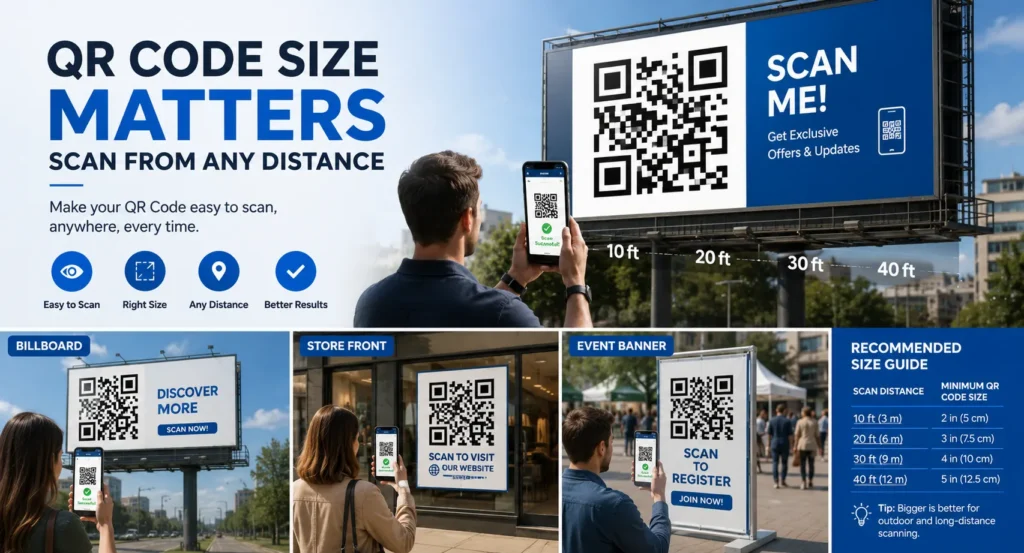
A QR code that works perfectly on a business card may fail completely on a billboard, storefront, event banner, or vehicle wrap. If people need to scan your QR code from several feet away, size and design become critical.
Whether you’re creating QR codes for outdoor advertising, real estate signs, trade shows, restaurant windows, or event displays, optimizing for long-distance scanning can dramatically increase engagement and scan rates.
This guide explains how to make a QR code scannable from far away using proven design, sizing, and placement techniques.
Table of Contents
- Why Distance Matters
- The QR Code Size Rule
- Choose High Contrast Colors
- Keep QR Code Data Simple
- Use High Resolution Files
- Best Placement Practices
- Common Mistakes to Avoid
- FAQ
Why Distance Matters for QR Codes
Smartphone cameras need enough detail to accurately read the QR code pattern.
As viewing distance increases, the QR code appears smaller to the camera. If the code is too small or contains too much data, scanning becomes difficult or impossible.
That’s why QR codes designed for posters, signs, billboards, and storefronts require different specifications than QR codes used on business cards.
Create High-Quality QR Codes for Free
Generate professional QR codes optimized for signs, posters, marketing materials, and long-distance scanning.
Create QR CodeThe 10:1 QR Code Size Rule
A commonly used guideline is:
Examples:
| Scanning Distance | Recommended QR Size |
|---|---|
| 1 Meter (3.3 ft) | 10 cm (4 in) |
| 2 Meters (6.5 ft) | 20 cm (8 in) |
| 5 Meters (16 ft) | 50 cm (20 in) |
| 10 Meters (33 ft) | 100 cm (40 in) |
The farther away users are, the larger your QR code should be.
Use High Contrast Colors
Contrast is one of the biggest factors affecting scan performance.
Best Combination:
- Black QR code on white background
- Dark colors on light backgrounds
- Strong contrast between foreground and background
Avoid:
- Light gray on white
- Yellow backgrounds
- Low contrast colors
- Complex patterns behind the QR code
High contrast helps cameras identify QR code modules more accurately.
Reduce the Amount of Data
QR codes containing large amounts of information become more complex and harder to scan from a distance.
For better long-distance performance:
- Use short URLs
- Use dynamic QR codes
- Avoid excessive text encoding
- Keep data as simple as possible
Simpler QR codes have larger squares and better readability.
Need QR Codes for Posters or Billboards?
Create clean, high-resolution QR codes optimized for long-distance scanning.
Generate QR CodeUse Vector Files for Printing
When printing large QR codes, always use:
- SVG files
- EPS files
- PDF vector files
Avoid low-resolution JPG or PNG files that may become blurry when enlarged.
Sharp edges are essential for accurate scanning.
Maintain a Quiet Zone
Every QR code needs empty space around it called a “quiet zone.”
This white border helps smartphone cameras distinguish the QR code from surrounding graphics.
Recommended Quiet Zone:
At least 4 modules wide on all sides.
Never place text, logos, or images directly against the QR code.
Best Placement Practices
Outdoor Signs
- Place at eye level when possible
- Avoid glare from direct sunlight
- Ensure sufficient lighting
Posters
- Keep QR codes in high-visibility areas
- Avoid folding lines
- Use large clear margins
Storefronts
- Position near entrances
- Ensure visibility from sidewalks
- Avoid reflections on glass surfaces
Add a Clear Call-to-Action
People are more likely to scan when they know what they’ll receive.
Examples:
- Scan for Menu
- Scan for Directions
- Scan to Register
- Scan for Discount
- Scan to View Property
A strong CTA can significantly improve scan rates.
The biggest reason large QR codes fail is not size—it’s poor contrast, blurry printing, or bad placement.
Common Mistakes to Avoid
- Making the QR code too small
- Using low-resolution images
- Adding too much data
- Ignoring the quiet zone
- Using low-contrast colors
- Placing QR codes where glare occurs
- Not testing from actual scanning distances
Always Test Before Printing
Before printing hundreds or thousands of materials:
- Print a sample.
- Place it at the intended location.
- Test from the expected scanning distance.
- Use multiple smartphone models.
- Verify scanning speed and reliability.
Testing helps identify problems before they become expensive mistakes.
Create QR Codes That Scan Instantly
Generate professional QR codes optimized for posters, storefronts, billboards, events, and marketing campaigns.
Start CreatingFrequently Asked Questions
How big should a QR code be for a billboard?
Use the 10:1 rule. For example, a QR code scanned from 30 feet away should be approximately 36 inches wide.
Can colored QR codes be scanned from far away?
Yes, as long as there is strong contrast between the QR code and the background.
What file format is best for large QR codes?
SVG and other vector formats provide the best print quality at large sizes.
Do dynamic QR codes scan better?
Often yes, because they usually contain shorter URLs, resulting in simpler QR code patterns.
Final Thoughts
If you want to make a QR code scannable from far away, focus on size, contrast, simplicity, and placement. A large, high-contrast QR code with minimal encoded data will scan much more reliably than a small, complex design.
By following these best practices, you can create QR codes that work effectively on billboards, storefronts, signs, vehicles, trade show displays, and other large-format marketing materials.

Leave a Reply