
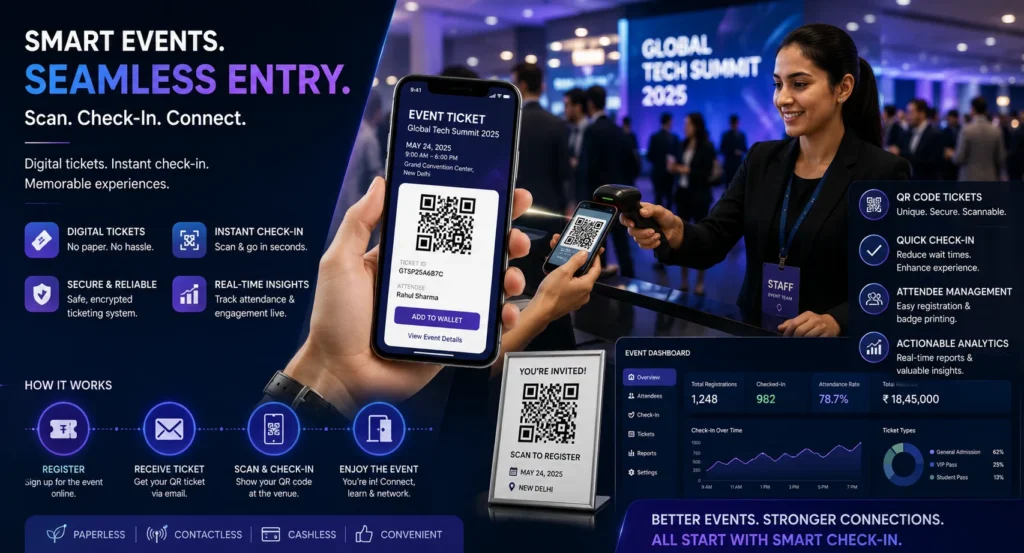
Event organizers are increasingly using QR codes to simplify invitations, ticketing, registrations, and attendee check-ins. A QR code for an event can eliminate paperwork, speed up entry, reduce errors, and create a smoother experience for guests.
Whether you’re organizing a conference, wedding, trade show, seminar, workshop, fundraiser, concert, or networking event, QR codes make event management more efficient and professional.
This guide explains how to create event QR codes for invitations, tickets, registrations, and check-in systems step by step.
Table of Contents
- What Is an Event QR Code?
- Benefits of Event QR Codes
- How to Create a QR Code for an Event
- Using QR Codes for Invitations
- Using QR Codes for Tickets
- Using QR Codes for Check-In
- Best Practices
- Frequently Asked Questions
What Is an Event QR Code?
An event QR code is a scannable code that directs attendees to event-related information such as registration pages, digital invitations, tickets, schedules, venue maps, or check-in systems.
Guests simply scan the QR code using their smartphone to access the information instantly.
Common Event QR Code Uses
- Digital invitations
- Online registration forms
- Event tickets
- Check-in and attendance tracking
- Venue maps
- Event schedules
- Speaker information
- Feedback forms
Create Event QR Codes in Minutes
Generate QR codes for event registration, invitations, tickets, schedules, and attendee engagement.
Create Event QR CodeBenefits of Using QR Codes for Events
Faster Check-In
Reduce queues and speed up attendee entry.
Paperless Events
Eliminate printed tickets and registration forms.
Better Organization
Centralize event information in one place.
Improved Attendee Experience
Provide instant access to schedules, maps, and updates.
How to Create a QR Code for an Event
Step 1: Decide What the QR Code Will Link To
Choose the destination based on your event needs:
- Registration page
- Event website
- Digital invitation
- Ticket download page
- Venue directions
- Schedule or agenda
Step 2: Copy the URL
Copy the link to the event page, registration form, or ticketing platform.
Step 3: Open a QR Code Generator
Use a QR code generator and select the URL option.
Step 4: Generate the QR Code
Paste your event URL and generate the QR code instantly.
Step 5: Customize and Download
Add branding, colors, and your event logo if desired.
Step 6: Test Before Publishing
Scan the QR code using multiple devices to ensure everything works properly.
Simplify Event Registration & Entry
Create QR codes that connect attendees directly to registrations, tickets, and event information.
Generate QR CodeUsing QR Codes for Event Invitations
Instead of printing lengthy URLs on invitations, add a QR code that links directly to:
- RSVP forms
- Event websites
- Venue details
- Calendar downloads
- Guest information pages
Guests can register or confirm attendance within seconds.
Using QR Codes for Event Tickets
QR codes are commonly used as digital tickets.
- Concert tickets
- Conference passes
- Workshop registrations
- Festival entry passes
- VIP access credentials
Each attendee receives a unique QR code that can be scanned at entry points.
Using QR Codes for Event Check-In
Check-in QR codes allow staff to verify attendance quickly and accurately.
Benefits Include:
- Reduced waiting times
- Automatic attendance tracking
- Improved security
- Real-time guest monitoring
- Reduced manual data entry
QR-based check-in systems can significantly reduce entry bottlenecks at large events.
Best Practices for Event QR Codes
- Use high-resolution QR codes.
- Add a clear call-to-action such as “Scan to Register”.
- Test on multiple devices.
- Use dynamic QR codes when event details may change.
- Place QR codes where attendees can easily see them.
- Include backup registration options if needed.
Common Mistakes to Avoid
- Linking to outdated event pages
- Using low-quality printed QR codes
- Making QR codes too small
- Not testing before launch
- Overcomplicating the registration process
Create Professional Event QR Codes Today
Generate QR codes for registrations, invitations, tickets, schedules, maps, and attendee engagement.
Start CreatingFrequently Asked Questions
Can QR codes be used as event tickets?
Yes. Many event organizers use QR codes as digital tickets that can be scanned at entry.
Do attendees need a special app?
Usually no. Most smartphones can scan QR codes directly through the camera app.
Can I update event information after creating the QR code?
If you use a dynamic QR code, you can update the destination without changing the printed QR code.
Are event QR codes secure?
They can be secure when paired with unique ticket IDs and verified check-in systems.
Final Thoughts
Creating a QR code for an event is one of the easiest ways to streamline invitations, registrations, ticketing, and attendee check-ins. QR codes help reduce paperwork, improve organization, and create a more professional event experience.
Whether you’re planning a small gathering or a large conference, QR codes can simplify event management while improving convenience for both organizers and attendees.

Leave a Reply