
PDF Compressor — Reduce PDF Size Instantly
Compress PDF online free — reduce PDF file size without losing quality. Fast, secure, 100% in your browser.
🔒 Your file never leaves your device. This pdf compressor runs 100% in your browser.
This free PDF compressor helps you reduce PDF size instantly without uploading your files to any server. Whether you need to compress PDF online free for email, shrink a document for a web upload limit, or simply reduce PDF file size before sharing, this tool gets it done in seconds. Our compress PDF online tool uses client-side compression technology powered by PDF-Lib — meaning your sensitive documents stay completely private. Use this pdfcompress tool to minimize PDF size with a single click, choosing between maximum compression, balanced output, or high-quality results based on your needs. No registration, no watermarks, no file size caps.
Why Use This Free PDF Compressor Tool?
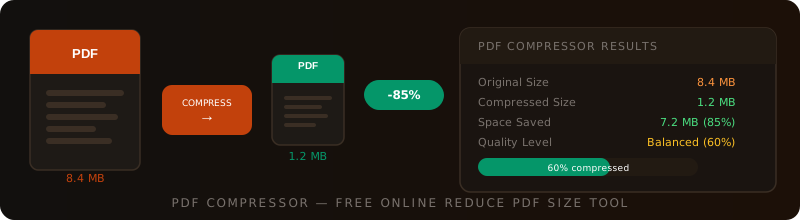
Large PDF files cause problems — email servers reject them, upload forms block them, and slow internet connections make sharing painful. A reliable pdf compressor solves all of these at once. Use this tool to reduce PDF size online before sending, storing, or publishing any document.
100% Private PDF Compressor
This compress PDF online free tool never uploads your file. All compression runs directly in your browser.
Adjustable Compression Level
Choose balanced, maximum, or high-quality mode to reduce PDF file size exactly as needed.
Instant Results
This compress PDF online tool processes your file in seconds with a live progress bar.
Works on Any Device
Use this reduce PDF size online tool on desktop, tablet, or mobile — no app needed.
How to Use This PDF Compression Tool?
Using this compress PDF online free tool to reduce PDF file size takes just a few seconds. Follow these simple steps:
Set Your Compression Level
Use the slider above to choose your preferred level. Drag left to minimize PDF size aggressively, or right to preserve higher quality while still reducing file size.
Upload Your PDF to the PDF Compressor
Drag and drop your PDF onto the upload area or click Choose PDF File. This pdf compressor accepts any standard PDF regardless of content type.
Watch the Compression Progress
A live progress bar tracks each stage as the tool works to reduce PDF size online. Processing typically completes in under 10 seconds.
Download Your Compressed PDF
Once done, your before and after stats are shown. Click Download Compressed PDF to save the smaller file. This compress PDF online free tool adds no watermarks.
Who Should Use This PDF Compressor?
This compress PDF online tool is built for anyone who regularly works with large PDF files and needs to reduce PDF size quickly without paying for expensive software.
Is This PDF Compressor Safe and Trusted?
Absolutely. This compress PDF online free tool is built on PDF-Lib, a trusted open-source JavaScript library used by thousands of developers worldwide. Your PDF file is never uploaded, transmitted, or stored on any server — everything runs inside your browser tab. This makes it one of the safest ways to reduce PDF file size available online. For more details on PDF standards and compression specifications, see the Adobe PDF Reference.
Use Cases of the PDF Compressor
Here are the most common real-world situations where you need to compress PDF online free and reduce PDF size before sharing or storing documents. You may also find our Merge PDF Online and Split PDF Online tools useful for further PDF management.
- Email Attachments: Most email providers cap attachments at 10–25 MB. Use this pdf compressor to reduce PDF file size and send documents without hitting limits.
- Online Form Uploads: Government portals, job applications, and university admission forms often restrict uploads to 1–5 MB. Compress PDF online to meet those limits instantly.
- Website PDF Downloads: Smaller PDFs load faster on websites. Reduce PDF size online to improve page speed and user experience for downloadable content.
- Cloud Storage Optimization: Save storage space in Google Drive, Dropbox, or OneDrive by using this compress PDF online free tool to minimize PDF size before uploading.
- Reduce PDF to 500 KB: For strict upload limits, drag the compression slider to maximum and use this pdfcompress tool to aggressively shrink large documents.
- Printing Cost Reduction: Compressed PDFs with optimised images can reduce printer data transfer times. Reduce PDF file size for faster, cheaper printing workflows.
- Mobile Sharing via WhatsApp: Messaging apps impose strict file size limits. This compress PDF online tool helps you share documents on any platform without issues.
PDF Compressor — Frequently Asked Questions
How to make a PDF compressor?
A pdf compressor works by removing redundant data, re-encoding embedded images at lower resolution, and restructuring the PDF object streams to reduce overall file size. This tool uses PDF-Lib, an open-source JavaScript library, to re-save the PDF using compressed object streams entirely in your browser. No server infrastructure is required — making this one of the safest and fastest compress PDF online free solutions available.
How does a PDF compress?
PDF compression works through several techniques: removing duplicate objects and unused resources, applying Flate (zlib) compression to content streams, re-encoding embedded images at reduced quality, and merging object streams. When you reduce PDF file size using this tool, the engine analyses the PDF structure and applies these techniques automatically. The result is a smaller file that retains the same text, layout, and visual content as the original.
How to use a PDF compression tool?
To use this pdf compressor: first set your compression level using the slider at the top of the tool — drag left for maximum compression or right for better quality. Then drag and drop your PDF file onto the upload area, or click Choose PDF File to browse. The tool will automatically compress PDF online free and display your before and after file sizes. Click Download Compressed PDF to save your reduce PDF size online result.
How to reduce a PDF file to 500 KB?
To reduce PDF file size to 500 KB or below, drag the compression slider to the far left (Maximum Compression mode) before uploading your file. This applies the most aggressive settings to minimize PDF size. The actual result depends on your PDF content — image-heavy PDFs compress more than text-only documents. If one pass is not enough, you can re-upload the output through this compress PDF online tool for a second pass of compression.
Is there a free PDF compressor?
Yes — this tool is a completely free pdf compressor. There are no charges, no subscriptions, and no watermarks. It is a compress PDF online free solution that works entirely in your browser, meaning your files are never uploaded to any server. Unlike many online tools that impose daily limits or file size caps, this reduce PDF size online tool is free to use as many times as you need.
More Free Online Tools
Discover our full collection of free developer and converter tools — no signup required.