
XML Formatter & Beautifier
Instantly format, beautify, and validate XML online — clean, indented, and readable in one click.
The XML formatter is a powerful free tool that instantly beautifies, indents, and validates your XML code online. Whether you need to beautify XML from an API response, use an XML beautifier online to fix messy markup, or simply run a quick xml formatter online check before deploying, this tool handles it in seconds — no installation, no account, no cost. Proper XML formatting makes your code readable, debuggable, and maintainable. Use this beautifier XML tool to clean up any XML file instantly.
Why Use This Free XML Formatter Tool?
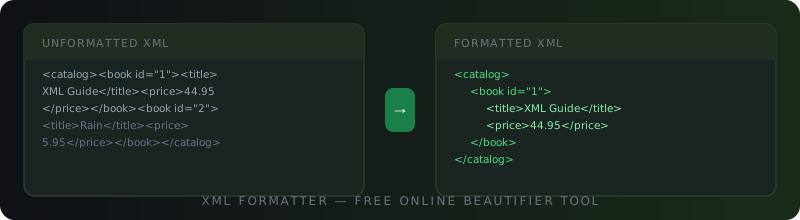
Raw XML is often returned as a single unreadable line — especially from APIs, databases, and config files. A reliable xml formatter transforms that chaos into clean, indented, structured code. This xml beautifier online also validates your syntax, catching errors before they cause production bugs.
Instant XML Beautifier
Paste any XML and the xml formatter online returns perfectly indented, human-readable output in milliseconds.
Built-in XML Validator
This xml formatter validates your syntax and highlights errors before formatting, so you catch problems early.
100% Private & Secure
All XML formatting runs in your browser. Your code is never sent to any server.
Minify Mode Included
Need compact XML? Switch to minify mode to strip all whitespace and reduce file size instantly.
How to Use the XML Formatter Online
Using this xml formatter online takes just seconds. Here is how to beautify XML or minify it step by step:
Paste Your XML into the XML Formatter
Copy your raw, minified, or messy XML and paste it into the input field of this xml formatter. You can also click Sample to load an example.
Choose Format or Minify Mode
Select the Format / Beautify tab to beautify XML with proper indentation, or switch to Minify to compress it into a single line for production use.
Select Your Indent Style
Choose 2 spaces, 4 spaces, or tabs — whatever matches your project’s XML formatting standard. The xml beautifier respects your preference.
Click Format XML & Copy the Output
Hit the Format XML button. Your beautifully formatted result appears instantly. Click Copy Result to copy the output of this xml beautifier online to your clipboard.
Who Should Use This XML Formatter?
This xml formatter is designed for anyone who works with XML data, configuration, or markup on a regular basis. From quick xml beautify tasks to full xml file formatter workflows, this tool fits every use case.
Is This XML Formatter Safe and Trusted?
Yes — completely. This xml formatter online processes everything directly in your browser using JavaScript’s native DOMParser API. No XML data is ever uploaded, transmitted, or stored on any server. Whether you are formatting sensitive configuration files, API responses, or internal data exports, your content stays 100% private. This approach aligns with the W3C XML specification, the international standard that defines valid XML syntax. You can also verify the format rules at the official W3Schools XML syntax reference.
Use Cases of the XML Formatter
From debugging APIs to cleaning up configuration files, here are the most common real-world scenarios where you will need to xml beautify or format code using a reliable xml formatter online. You may also find our JSON formatter useful for similar tasks.
- API Response Debugging: Use this xml formatter to instantly beautify XML responses from REST or SOAP APIs and make them readable for debugging.
- Config File Cleanup: Format messy
web.config,pom.xml,AndroidManifest.xml, and other configuration files using this xml file formatter. - Data Exchange Files: Clean up XML data files used in EDI, ERP, or CRM integrations with this xml beautifier online before sharing with partners.
- Sitemap Formatting: Paste your
sitemap.xmlinto this xml formatter online to verify structure and check for missing tags or broken syntax. - RSS & Atom Feeds: Use the xml beautify feature to inspect and validate RSS or Atom feed XML before publishing to subscribers.
- SVG File Editing: Format SVG files — which are XML-based — using this xml formatter to read and edit path data and attributes easily.
- Code Reviews: Share clean, indented XML snippets in pull requests and documentation by running them through this beautifier xml tool first.
XML Formatter — Frequently Asked Questions
What is an XML formatter?
An xml formatter is a tool that takes raw or unindented XML code and restructures it with proper line breaks and indentation, making it easy to read and understand. This xml formatter online also validates the XML syntax using the browser’s native parser, alerting you to errors like unclosed tags or malformed attributes before formatting. Think of it as an automatic code beautifier for any XML file.
What is XML format used for?
XML (Extensible Markup Language) is a universal data format used to store, transfer, and describe structured data. Common uses include API data exchange (SOAP services), application configuration files (pom.xml, web.config), RSS and Atom feeds, SVG graphics, Microsoft Office file formats (DOCX, XLSX), Android manifests, and sitemap files. Proper XML formatting is essential for debugging and maintaining these files, which is why a good xml formatter is a must-have developer tool.
What is beautify the XML code?
To beautify XML means to reformat compressed or poorly structured XML into a clean, properly indented, and human-readable layout. When XML is transmitted over networks or stored in databases, it is often stripped of whitespace to save bandwidth. An xml beautifier online like this tool reverses that process — adding line breaks after each tag and indenting nested elements — so developers can read, understand, and debug the structure quickly. The result of xml beautify is the same data, just formatted for humans.
How to beautify XML?
To beautify XML using this tool: paste your raw XML into the input box above, make sure the Format / Beautify tab is selected, choose your preferred indentation (2 spaces, 4 spaces, or tabs), then click Format XML. This xml beautifier online will instantly produce clean, indented output. Click Copy Result to copy your beautifully formatted XML to the clipboard. The entire process is free, instant, and private.
What is XML formatting?
XML formatting refers to the process of applying consistent structure, indentation, and line breaks to XML code so that it follows a readable and standardised layout. Good XML formatting uses proper nesting — each child element is indented relative to its parent — and places each element on its own line. This xml formatter online automates that process, applying the chosen indentation style to every level of your XML tree so your output is always clean and consistent.
More Free Online Tools
Discover our full collection of free developer and converter tools — no signup required.